My Service Canada Account (MSCA) - Canada.ca
- Français
Potential delays in Canada Post delivery services
Mail delivery for some programs and services may be delayed. Consult the measures in place during the potential disruption of Canada Post services.
Mail delivery for some programs and services may be delayed. Consult the measures in place during the potential disruption of Canada Post services.
Sign in to your account to access and manage a wide range of government services and benefits.
Access your Canada Revenue Agency (CRA) tax information To access your personal income tax slips (such as T3, T4, T4RIF, T4RSP, T5, T5007 and T5008), visit CRA My account for Individuals.
How to change your direct deposit information, mailing address or telephone number The option to change your personal information is currently unavailable for some MSCA services. Visit Change your personal information to learn more about your options.
Sign in
- Interac® Sign-In Partnerbank Sign-In
- GCKey username and passwordGCKey Sign-In
- Provincial sign-in (BC and AB only)Province Sign-In
Not sure how to sign in?You registered with either GCKey, Interac® Sign-In Partner or provincial sign-in when you created your account.
Use the option you registered with every time you sign in. It’s tied to your account and user profile.
If you want to choose another sign in option, you’ll have to register for it.
Get more help with your account.
Create an account
Register for an account- Interac® Sign-In Partnerbank Sign-In
- GCKey username and passwordGCKey Sign-In
- Provincial sign-in (BC and AB only)Province Sign-In
Not sure how to sign in?You registered with either GCKey, Interac® Sign-In Partner or provincial sign-in when you created your account.
Use the option you registered with every time you sign in. It’s tied to your account and user profile.
If you want to choose another sign in option, you’ll have to register for it.
Get more help with your account.
Register for an accountInterac® Sign-In Partner and Interac® verification service
Interac® Sign-In Partner (bank)
Interac® Sign-In Partner allows you to register or sign in using your online sign in banking information to access MSCA.
If you moved to a new financial institution, you may be able to switch your Sign-In Partner by following these steps:
- select Interac® Sign-In Partner
- select Switch My Sign-In Partner from the top menu on the Select a Sign-In Partner page
- follow the steps to change your Sign-In Partner To learn more, visit Interac® sign-in for government services.
Interac® verification service
Interac® verification service allows you to verify your identity during your MSCA registration. You will only have to complete this step once.
To learn more, visit our Interac® verification service page.
Interac® Sign-In Partner allows you to register or sign in using your online sign in banking information to access MSCA.
If you moved to a new financial institution, you may be able to switch your Sign-In Partner by following these steps:
- select Interac® Sign-In Partner
- select Switch My Sign-In Partner from the top menu on the Select a Sign-In Partner page
- follow the steps to change your Sign-In Partner To learn more, visit Interac® sign-in for government services.
Interac® verification service
Interac® verification service allows you to verify your identity during your MSCA registration. You will only have to complete this step once.
To learn more, visit our Interac® verification service page.
GCKey helpGCKey allows you to access multiple Government of Canada online services. Visit GCKey help page to learn more about:
- how to create a GCKey username and password
- how to sign in using GCKey
- what to do if you forgot your username and password
- how to change your password and recovery questions
- what to do if your GCKey has been revoked
Contact GCKey
If you wish to speak to a GCKey representative, visit GCKey Contact us.
If you wish to speak to a GCKey representative, visit GCKey Contact us.
Where to find your Personal Access Code (PAC)PACs are used to verify your identity when registering for MSCA. If you already applied for CPP/OAS benefits, your PAC has been sent to you by mail.
To learn more or to request a PAC, visit the page Verify your identity with a PAC.
Online safety and how to avoid technical issues
Protect your personal information
- Be aware of your surroundings when you enter passwords and security codes in public
- Don’t share your passwords or security codes
- Sign out of MSCA when you are done, then close your browser
Avoid technical problems
-
Don’t bookmark secure MSCA pages (which means the pages you see after you sign in)
-
Use one of the following Web browsers:
-
Google Chrome
-
Safari
-
Microsoft Edge
-
Mozilla Firefox
-
For Apple users, use one of the following operating system:
-
iOS (version 13 or newer)
-
MacOS (version 10.15 or newer)
-
Enable cookies and JavaScript in your browser
-
Be aware of your surroundings when you enter passwords and security codes in public
-
Don’t share your passwords or security codes
-
Sign out of MSCA when you are done, then close your browser
Avoid technical problems
-
Don’t bookmark secure MSCA pages (which means the pages you see after you sign in)
-
Use one of the following Web browsers:
-
Google Chrome
-
Safari
-
Microsoft Edge
-
Mozilla Firefox
-
For Apple users, use one of the following operating system:
-
iOS (version 13 or newer)
-
MacOS (version 10.15 or newer)
-
Enable cookies and JavaScript in your browser
Multi-factor authenticationMulti-factor authentication is a mandatory enhanced security measure. It has been implemented in MSCA to protect your personal information.
To learn more, visit the page Multi-factor authentication to access MSCA.
Contact us- Canadian Dental Care Plan – Contact us
-
Employment Insurance Contact information - Individuals
-
Contact the Canada Pension Plan
-
Contact Old Age Security
-
Canada Disability Benefit – Contact us
-
Contact the Social Insurance Number – Contact us
-
National Student Loans Service Centre program
-
Canada Apprentice Loan – Contact us
-
Canadian Dental Care Plan
-
Employment Insurance
-
Canada Pension Plan
-
Old Age Security
-
Canada Disability Benefit
-
Social Insurance Number
-
National Student Loans Service Centre
-
Canada Apprentice Loan online service account
All Government of Canada online accounts
There are many accounts across the Government of Canada for different services. Find the service you need.
There are many accounts across the Government of Canada for different services. Find the service you need.
Date modified:2025-07-15
FAQ
Best Legit Online Casino for Real Money
A legit online casino for real money should have a valid licence, clear payout rules, and a track record of paying players on time. For Canadian players, sites often mentioned as trustworthy include Jackpot City, Bitstarz, TonyBet, Casino Days, and LeoVegas, because they are commonly reviewed for real-money play, CAD support, and secure banking options. For example, Jackpot City is often described as a strong all-around choice for mainstream players, while Bitstarz is a better fit for people who want crypto payments and CAD-friendly deposits.
What is TP in WPT poker?
What is TP in WPT poker? Tournament Points (TPs) are used to buy into VIP tournaments on ClubWPT. All players start with a fixed amount of TPs (500) upon opening a VIP account. They cannot be reloaded, but will be automatically “topped up” once per day.
Is There Gambling in Alberta? Yes! Full 2026 Guide to Legal Casinos & Online Gaming
Yes, gambling is legal and widely available in Alberta. The province offers many regulated options including 18 casinos, over 30 racetracks, hundreds of bingo halls, more than 1,200 video lottery terminals (VLTs), and popular lotteries like Lotto Max and Lotto 6/49. For online gambling, PlayAlberta is the only fully legal site right now, but Alberta will launch a new regulated market with private operators like Jackpot.com and BetMGM on July 13, 2026.
Can You Really Play Play Alberta on Your Phone?
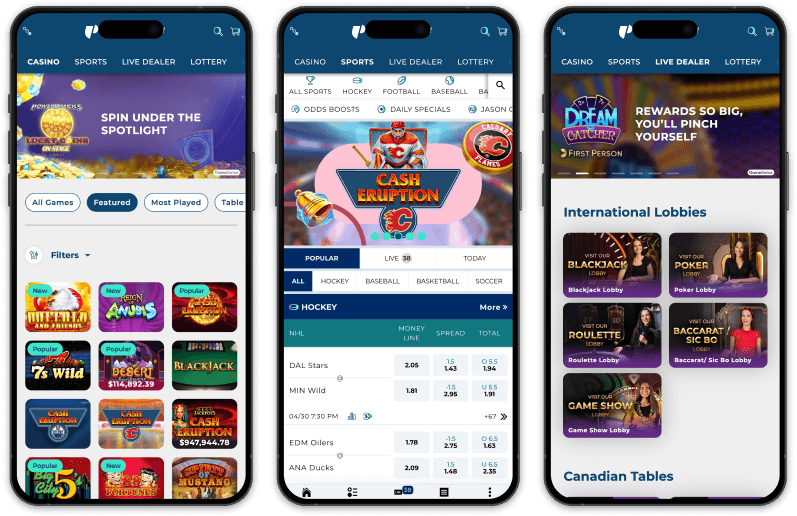
Yes, you can play Play Alberta on your phone, and it works well on both iPhones and Android devices. The platform lets you bet on sports, play online casino games, and try lottery and instant‑win products all from your mobile device. Whether you choose the official app or simply use your phone’s browser, Play Alberta is built to feel smooth and easy to use while you’re on the go. If you use an iPhone, you can download the “Play Alberta Casino & Sports” app from the Apple App Store.
When and where was the game of roulette first played?
When and where was the game of roulette first played? The game as we know it today first appeared in Paris in 1796, and quickly gained popularity throughout Europe, especially in the casinos of Monte Carlo. The addition of the zero by Francois and Louis Blanc in the mid-19th century helped to increase the house edge and make the game more profitable for casinos.
Play Alberta Guide: Login, Sign In, App and Online Casino Information
This site only collects related articles. Viewing the original, please copy and open the following link:My Service Canada Account (MSCA) - Canada.ca